


Backup Configuration
This guide explains how to view and create BackupConfiguration resources using the AppsCode console. A BackupConfiguration defines a complete backup policy for a database — including the storage backend, retention policy, backup sessions with their schedules and tasks, and the target database to back up.
1. Getting Started
Navigate to Backups in the left sidebar and select Backup Configuration. This opens the BackupConfiguration list page showing all existing configurations in your cluster.
2. BackupConfiguration List
The list page shows all BackupConfigurations across namespaces. Use the Select Namespace dropdown in the top-right to filter by namespace, or click Create New Instance to create a new one.

| Column | Description |
|---|---|
| Name | The name of the BackupConfiguration resource. |
| Namespace | The namespace where it is deployed. |
| Schedule | The cron expression defining the backup frequency. |
| Paused | Whether the backup schedule is currently paused. |
| Repository | The repository used to store backup snapshots. |
| BackupStorage | The underlying storage backend. |
| Target | The database resource being backed up. |
| Task | The backup task type (e.g., logical-backup). |
| RetentionPolicy | The policy controlling how long backups are kept. |
| Phase | The current status of the BackupConfiguration (e.g., Ready). |
| Age | How long ago the resource was created. |
3. Viewing a BackupConfiguration
Click on any BackupConfiguration name in the list to open its detail page. The detail page is divided into several panels giving a full picture of the configuration's state and linked resources.
3.1 - Overview
The detail page opens on the Overview tab, which shows the following sections:
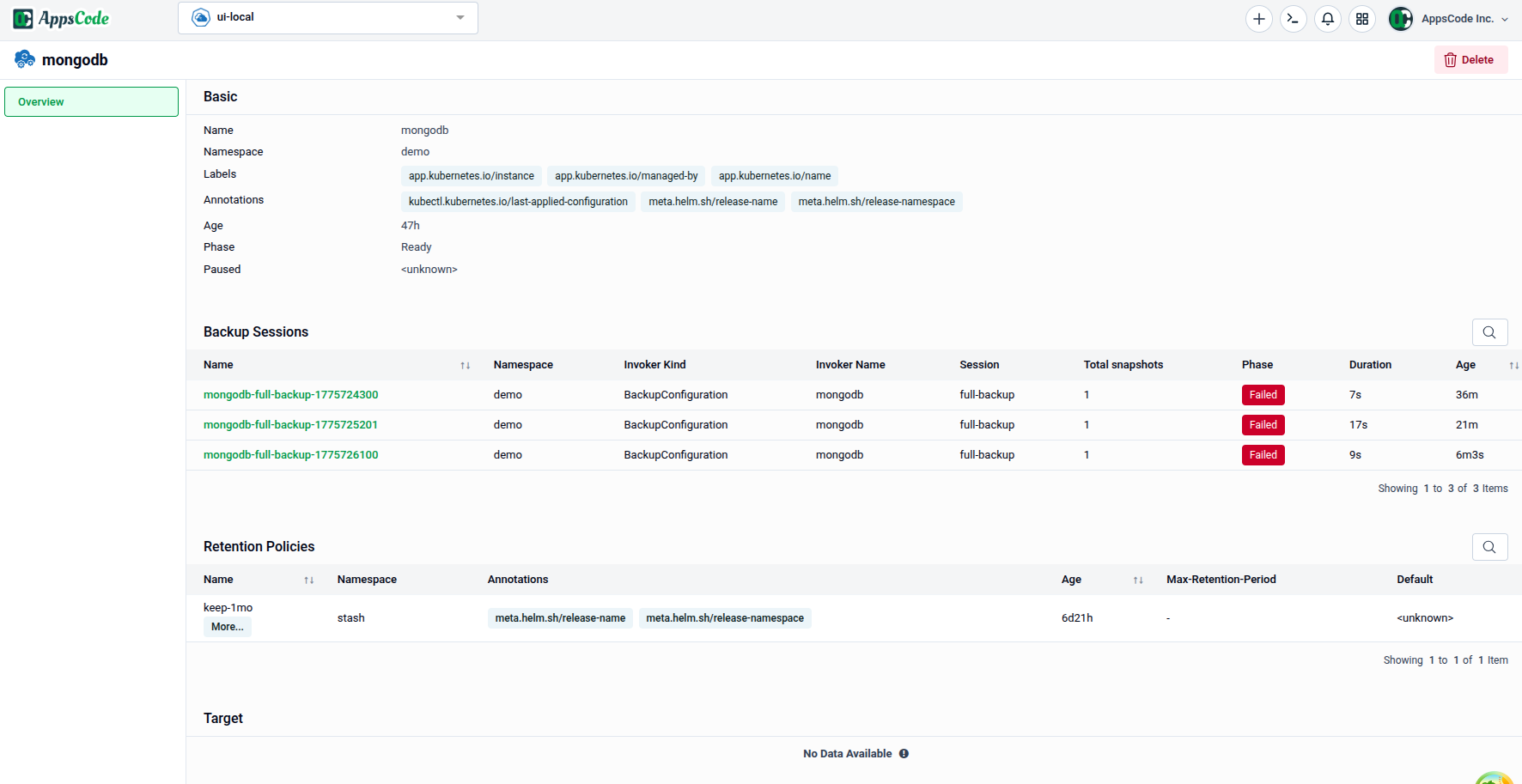
Basic — Core metadata for the resource:
| Field | Description |
|---|---|
| Name | The BackupConfiguration resource name. |
| Namespace | The namespace it belongs to. |
| Labels | Key-value labels attached to the resource. |
| Annotations | Key-value annotations including managed-by and apply-configuration references. |
| UID | The unique Kubernetes identifier for this resource. |
| Phase | Current lifecycle phase (e.g., Ready). |
| Paused | Whether the backup schedule is paused (true / false). |
Backup Sessions — Lists all active backup sessions linked to this configuration:
| Column | Description |
|---|---|
| Name | The name of the BackupSession resource. |
| Namespace | Namespace of the BackupSession. |
| Invoker Kind | The resource type that triggered the session (e.g., BackupConfiguration). |
| Invoker Name | The name of the invoker resource. |
| Session | The session name within the configuration (e.g., full-backup). |
| Total snapshots | Number of snapshots created in this session. |
| Phase | Current status of the session (e.g., Succeeded, Running). |
| Duration | Time taken to complete the session. |
| Age | How long ago the session was created. |
Retention Policies — Lists the RetentionPolicy resources linked to this configuration:
| Column | Description |
|---|---|
| Name | The RetentionPolicy resource name. |
| Annotations | Annotations referencing the linked namespace and name. |
| Age | Age of the RetentionPolicy resource. |
| Max Retention Period | How long backups are kept before being pruned. |
| Default | Whether this is the default retention policy. |
Target — Identifies the database resource being backed up. Shown as "No data available" if the target database has been removed or is not yet bound.
3.2 - Repository, BackupStorage and CronJobs
Scroll down on the detail page to view the linked infrastructure resources.
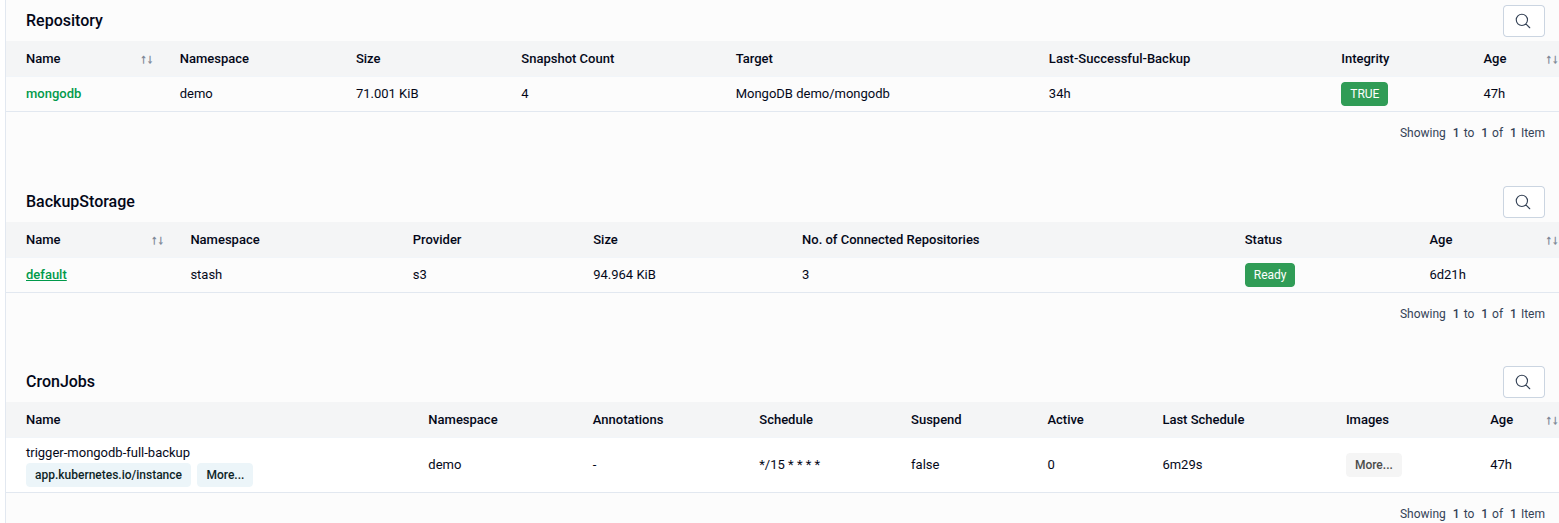
Repository — The backup repository storing snapshots for this configuration:
| Column | Description |
|---|---|
| Name | The repository resource name. |
| Namespace | Namespace of the repository. |
| Size | Total size of all stored snapshots (e.g., 71.001 KiB). |
| Snapshot Count | Number of snapshots currently stored. |
| Target | The database this repository backs up (e.g., MongoDB demo/mongodb). |
| Last-Successful-Backup | Time elapsed since the last successful backup. |
| Integrity | Whether the repository integrity check passed (TRUE / FALSE). |
| Age | Age of the repository resource. |
BackupStorage — The underlying storage backend connected to this configuration:
| Column | Description |
|---|---|
| Name | The BackupStorage resource name. |
| Namespace | Namespace of the BackupStorage. |
| Provider | Storage provider (e.g., s3). |
| Size | Total data stored across all connected repositories. |
| No. of Connected Repositories | Number of repositories using this storage. |
| Status | Current state of the storage backend (e.g., Ready). |
| Age | Age of the BackupStorage resource. |
CronJobs — The Kubernetes CronJob resources created to run backup sessions on schedule:
| Column | Description |
|---|---|
| Name | The CronJob resource name (e.g., trigger-mongodb-full-backup). |
| Namespace | Namespace of the CronJob. |
| Annotations | Annotations linking the CronJob to the BackupConfiguration instance. |
| Schedule | The cron expression driving the backup schedule (e.g., */15 * * * *). |
| Suspend | Whether the CronJob is currently suspended (true / false). |
| Active | Number of currently active job runs. |
| Last Schedule | Time elapsed since the CronJob last triggered. |
| Age | Age of the CronJob resource. |
4. Creating a BackupConfiguration
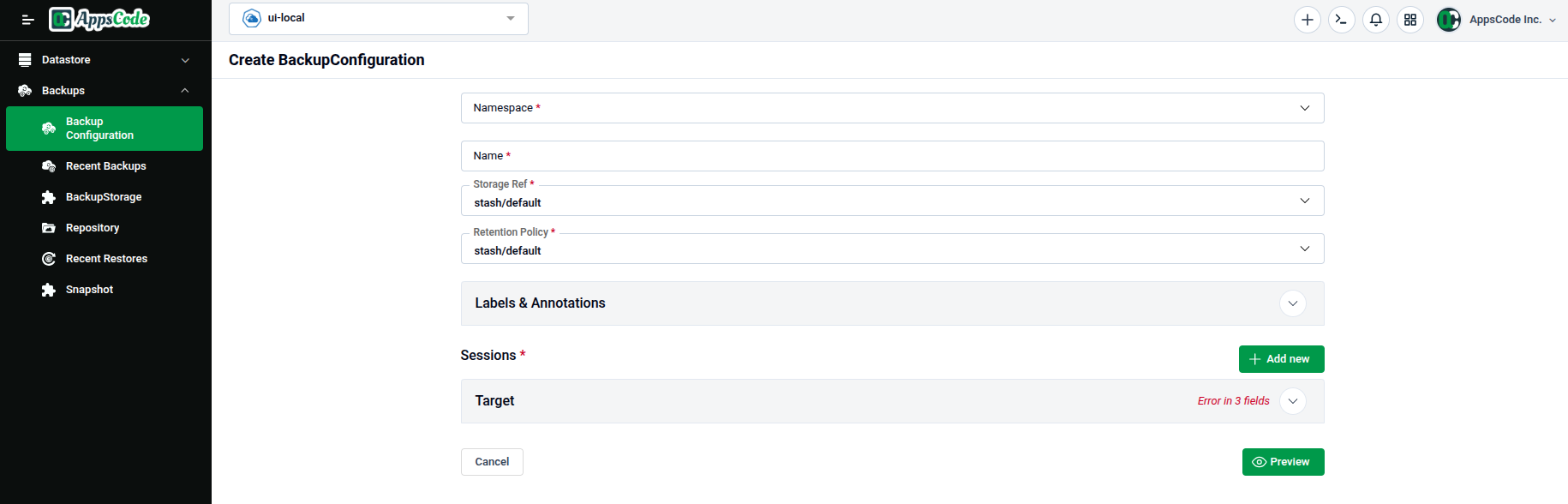
To create a new BackupConfiguration, click Create New Instance from the list page. The Create BackupConfiguration form will open containing the following sections:
- Namespace / Name / Storage Ref / Retention Policy — Core identity and storage fields.
- Labels & Annotations — Optional metadata for the resource.
- Sessions — One or more backup sessions defining schedule, addon, and tasks.
- Target — The database resource this BackupConfiguration applies to.
4.1 - Basic Information
The top section captures the core identity and storage references for the BackupConfiguration.
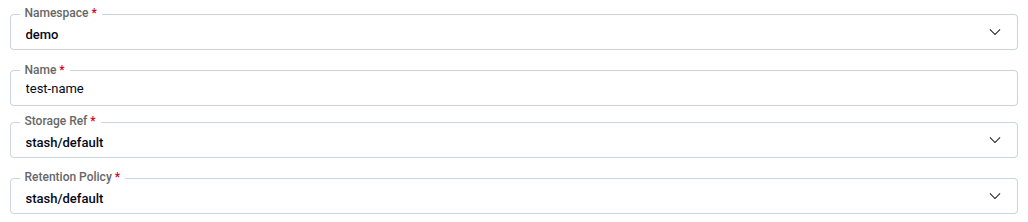
| Field | Description |
|---|---|
| Namespace | The Kubernetes namespace where the BackupConfiguration will be created. Required. |
| Name | A unique name for this BackupConfiguration (e.g., test-name). Required. |
| Storage Ref | Reference to the BackupStorage resource that defines where backups are stored (e.g., stash/default). Required. |
| Retention Policy | Reference to the RetentionPolicy resource that controls how long backups are kept (e.g., stash/default). Required. |
Note: All four fields are required (marked with a red asterisk). The Storage Ref and Retention Policy dropdowns list existing resources available in your cluster.
4.2 - Labels & Annotations
Expand the Labels & Annotations panel to attach custom metadata to the BackupConfiguration resource for organization, filtering, or integration with other Kubernetes tools.
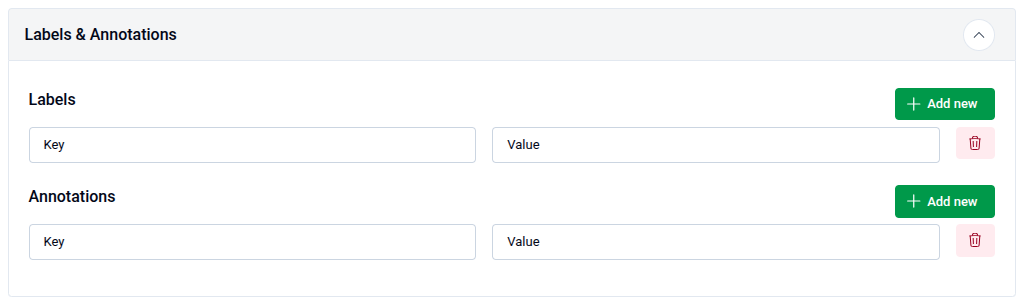
- Use + Add new under Labels to add key-value label pairs.
- Use + Add new under Annotations to add key-value annotation pairs.
- Use the delete icon on any row to remove an entry.
4.3 - Sessions
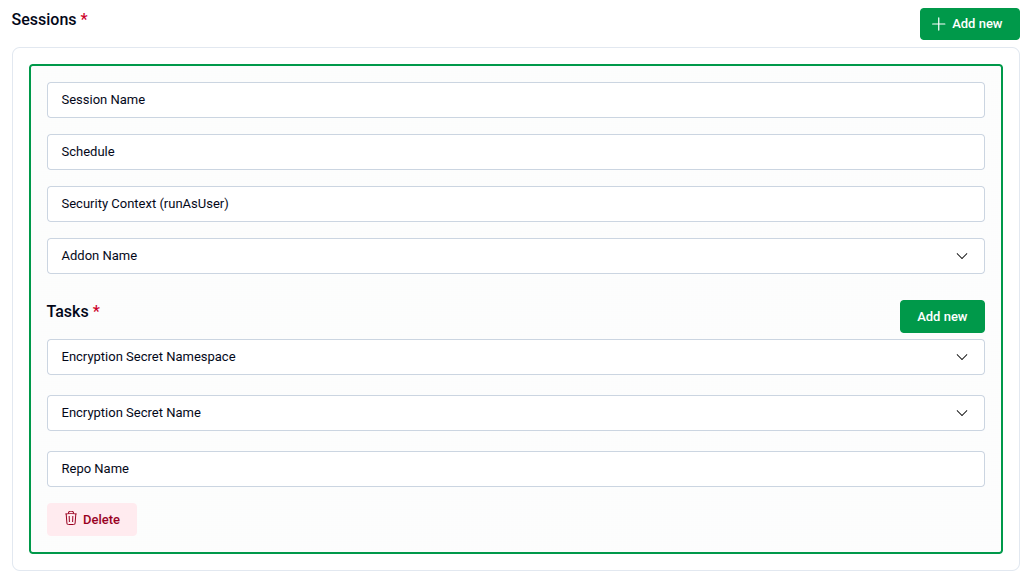
The Sessions section defines one or more backup sessions. Each session specifies when the backup runs, which addon to use, and what tasks to execute. Click + Add new to add a session entry.
| Field | Description |
|---|---|
| Session Name | A unique name for this backup session (e.g., full-backup). |
| Schedule | A cron expression defining when this session runs (e.g., */30 * * * * for every 30 minutes). |
| Security Context (runAsUser) | The UID the backup job container runs as. |
| Addon Name | The backup addon to use for this session. Select from the dropdown. |
Use the Delete button at the bottom of a session entry to remove it.
4.3.1 - Session Tasks
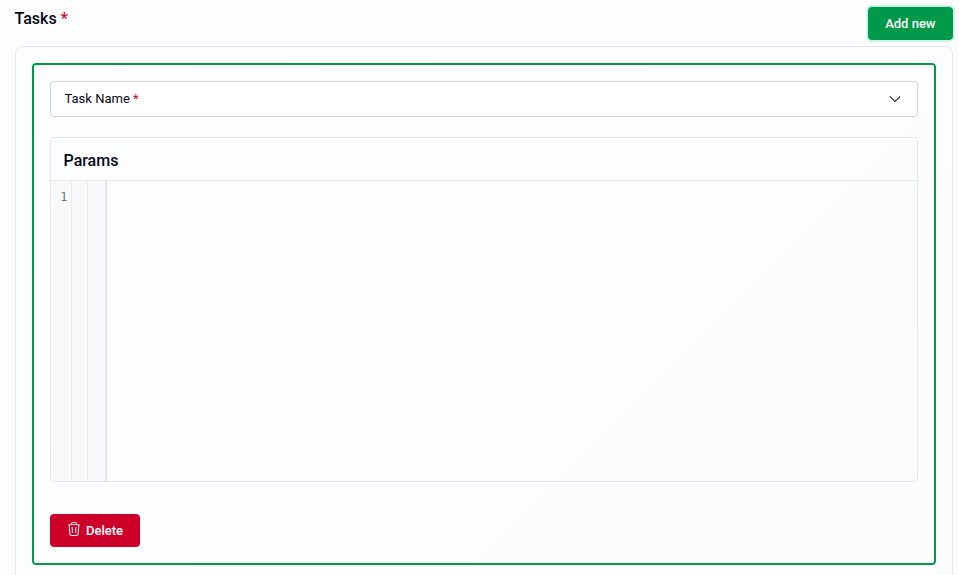
Each session must have at least one Task defined. Tasks describe the actual backup operation to perform. Click Add new inside the Tasks section to add a task entry.
| Field | Description |
|---|---|
| Task Name | The name of the backup task to execute. Select from the dropdown. Required. |
| Encryption Secret Namespace | The namespace of the Kubernetes Secret holding the encryption key. |
| Encryption Secret Name | The name of the Kubernetes Secret holding the encryption key. |
| Repo Name | The name of the repository within the storage backend where this task writes backups. |
| Params | Optional task-specific parameters in YAML format entered in the code editor. |
Note: Task Name is required. Use the Delete button at the bottom of a task entry to remove it. Multiple tasks can be added to a single session using Add new.
4.4 - Target
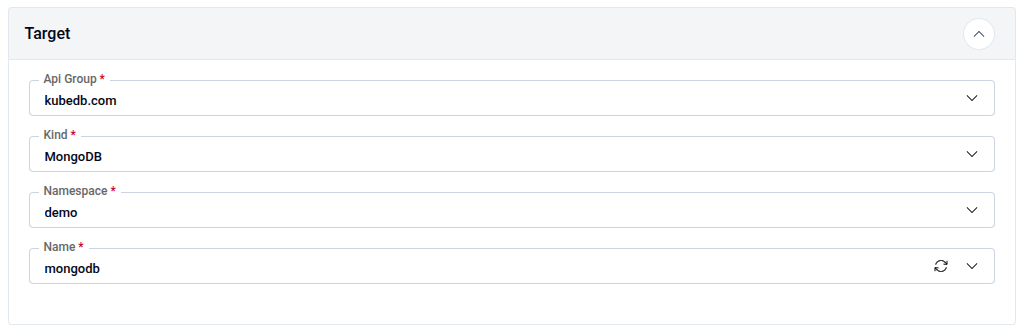
The Target section identifies the database resource that this BackupConfiguration will back up.
| Field | Description |
|---|---|
| Api Group | The API group of the target resource (e.g., kubedb.com). Required. |
| Kind | The resource kind of the target database (e.g., MongoDB). Required. |
| Namespace | The namespace where the target database resides (e.g., demo). Required. |
| Name | The name of the target database instance (e.g., mongodb). Required. |
Note: All four Target fields are required. If any are missing, the form will display an "Error in fields" warning on the Target panel header.
5. Preview and Submit
Once all required fields are filled, click Preview to review the generated BackupConfiguration manifest before applying it.
- The manifest is shown in YAML view by default. Use the JSON button to switch to JSON format if preferred.
- Use the Copy button to copy the manifest to your clipboard.
- Click Previous to go back and adjust your settings if needed.
Tip: You can directly edit the YAML or JSON on the Preview page before submitting. This is useful for making precise adjustments beyond what the form fields expose.
- Submit: Once satisfied, click Submit to create the BackupConfiguration in your cluster.
Note: After submitting, the BackupConfiguration will immediately begin scheduling backup sessions according to the cron expressions you defined.
Quick Reference
| Action | How to do it |
|---|---|
| View all BackupConfigurations | Backups → Backup Configuration |
| Filter by namespace | Use the Select Namespace dropdown on the list page |
| View detail of a config | Click on the BackupConfiguration name in the list |
| Check backup session status | Detail page → Backup Sessions table |
| Check repository integrity | Detail page → Repository table → Integrity column |
| View linked CronJobs | Detail page → CronJobs table |
| Open the create form | List page → Create New Instance |
| Set storage backend | Storage Ref dropdown → select a BackupStorage resource |
| Set retention policy | Retention Policy dropdown → select a RetentionPolicy resource |
| Add labels or annotations | Labels & Annotations → + Add new → enter Key and Value |
| Add a backup session | Sessions → + Add new → fill Session Name, Schedule, Addon Name |
| Add a task to a session | Tasks → Add new → select Task Name → optionally add Params |
| Encrypt backup data | Tasks → set Encryption Secret Namespace and Encryption Secret Name |
| Set the backup target | Target → fill Api Group, Kind, Namespace, and Name |
| Review before creating | Click Preview |
| Edit manifest directly | Use the YAML / JSON toggle on the Preview page |
| Create the configuration | Click Submit on the Preview page |