


External Authentication Sources
Site administrators can enable third-party OAuth login providers (such as GitHub, Google, or others) so users can sign in using their existing external accounts.
Add an External Authentication Source
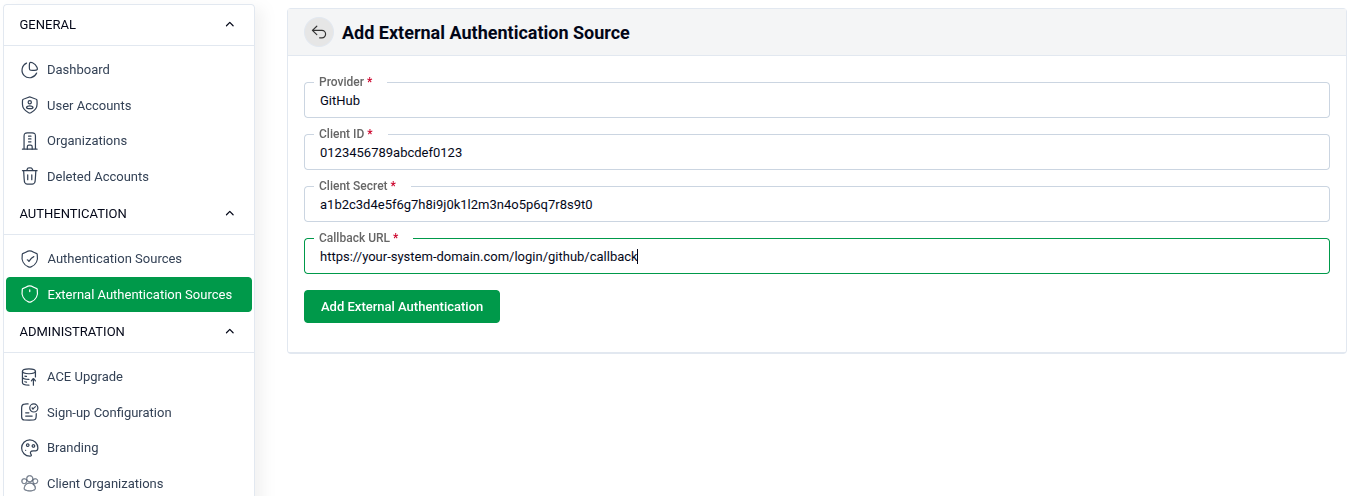
Go to SITE ADMINISTRATION > External Authentication Sources and fill in the form.
- Provider: Select or enter the OAuth provider name (e.g.,
GitHub). - Client ID: The application Client ID obtained from the provider's developer settings (e.g.,
0123456789abcdef0123). - Client Secret: The Client Secret key from the provider's developer settings.
- Callback URL: The redirect URL that the provider sends users back to after authentication (e.g.,
https://your-system-domain.com/login/github/callback).- This URL must be registered exactly in your provider's OAuth app settings.
Click Add External Authentication to save and activate the provider.
How to Obtain Credentials
Before filling in the form, you must register an OAuth application with your chosen provider:
- GitHub: Go to Settings > Developer settings > OAuth Apps > New OAuth App.
- Google: Go to Google Cloud Console > APIs & Services > Credentials > Create OAuth Client ID.
Copy the generated Client ID and Client Secret from the provider and paste them into the form above.