


Authentication Sources
Site administrators can configure external authentication backends (such as LDAP) to allow users to log in using their organization's existing credentials.
Add an Authentication Source
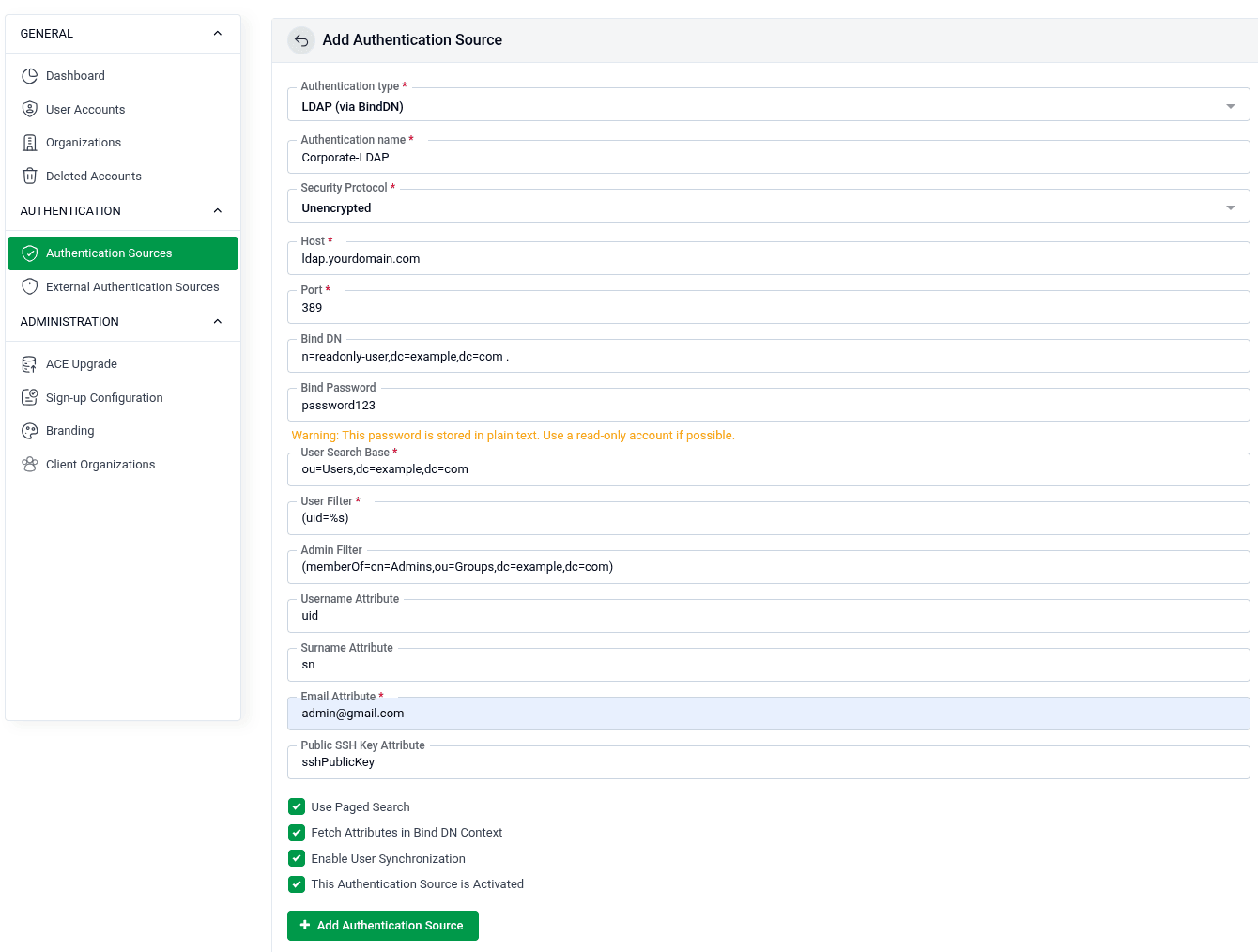
Go to SITE ADMINISTRATION > Authentication Sources and configure a new source using the form below.
- Authentication Type: Select the backend type from the dropdown. Example:
LDAP (via BindDN). - Authentication Name: A label to identify this source (e.g.,
Corporate-LDAP). - Security Protocol: Choose the connection security —
Unencrypted,LDAPS, orStartTLS. - Host: The hostname or IP address of your LDAP server (e.g.,
ldap.yourdomain.com). - Port: The port your LDAP server listens on (default:
389for unencrypted,636for LDAPS). - Bind DN: The distinguished name of the service account used to query the directory (e.g.,
cn=readonly-user,dc=example,dc=com). - Bind Password: The password for the Bind DN account.
- ⚠️ Warning: This password is stored in plain text. Use a read-only account if possible.
- User Search Base: The directory path to search for users (e.g.,
ou=Users,dc=example,dc=com). - User Filter: An LDAP filter to match user entries (e.g.,
(uid=%s)). - Admin Filter: An optional filter to identify admin users (e.g.,
(memberOf=cn=Admins,ou=Groups,dc=example,dc=com)). - Username Attribute: The LDAP attribute mapped to the username (e.g.,
uid). - Surname Attribute: The attribute for the user's surname (e.g.,
sn). - Email Attribute: The attribute for the user's email address (e.g.,
mail). - Public SSH Key Attribute: The attribute for the user's SSH public key (e.g.,
sshPublicKey).
Options
- Use Paged Search: Enable this to handle large directories by fetching results in pages.
- Fetch Attributes in Bind DN Context: Retrieve user attributes using the Bind DN credentials.
- Enable User Synchronization: Automatically sync user data from the LDAP directory.
- This Authentication Source is Activated: Enable or disable this source without deleting it.
Click + Add Authentication Source to save the configuration.