






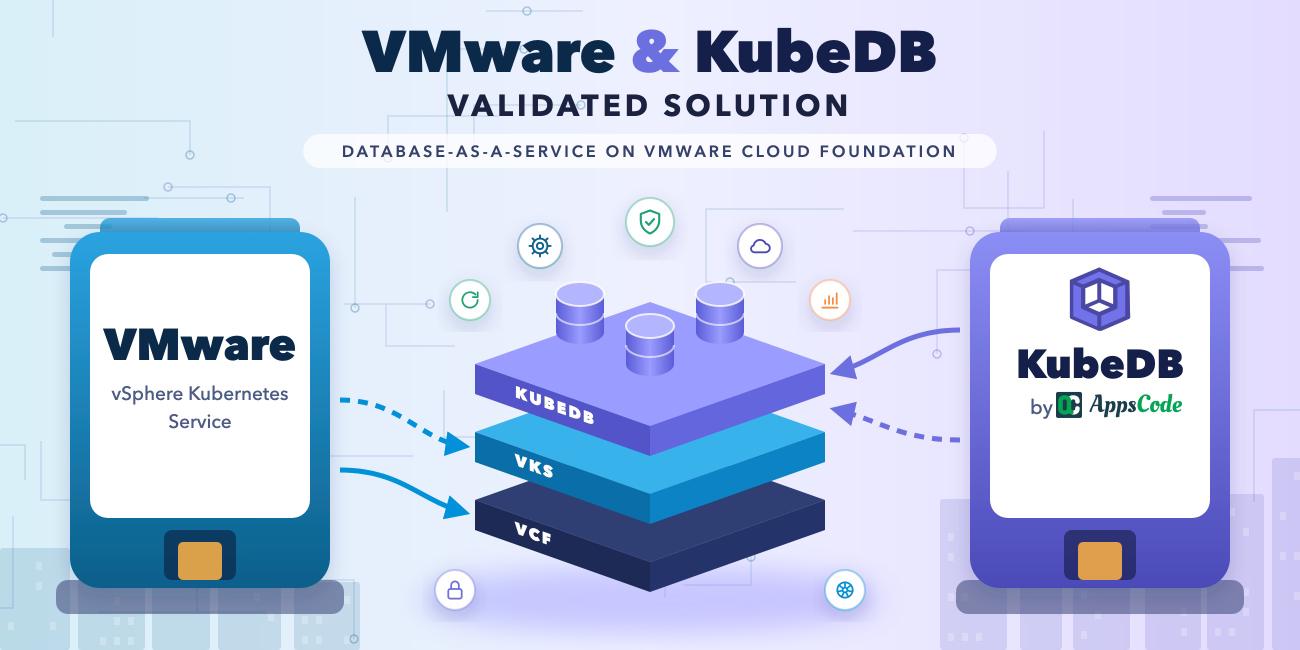
vSphere Kubernetes Service (VKS) gives your teams Kubernetes clusters on demand. Databases usually still come through a ticket queue. KubeDB closes that gap, and it is now validated on VKS. A production-ready database, with high availability, TLS, backups and monitoring built in, becomes one YAML object or a few clicks in a console, on the VMware Cloud Foundation (VCF) you already run.
Hyperscaler database services work only inside their own cloud, with their own APIs, tooling and hard-to-predict costs, and they’re often ruled out for regulated, sovereign or air-gapped sites. KubeDB runs on any conformant cluster, so hybrid estates get the same database API everywhere, with VCF as the validated home for the data they keep on premises.
AppsCode and VMware published the validated stack as a reference architecture, and KubeDB is listed among Broadcom’s Kubernetes software partners .
- Validated: VCF 9.0, VKS 3.7 and KubeDB v2026.10.12; all eight PostgreSQL high-availability tests passed
- What you get: 30+ database engines, automatic failover, backups, day-2 OpsRequests and monitoring
- Start here: reference architecture · step-by-step guide
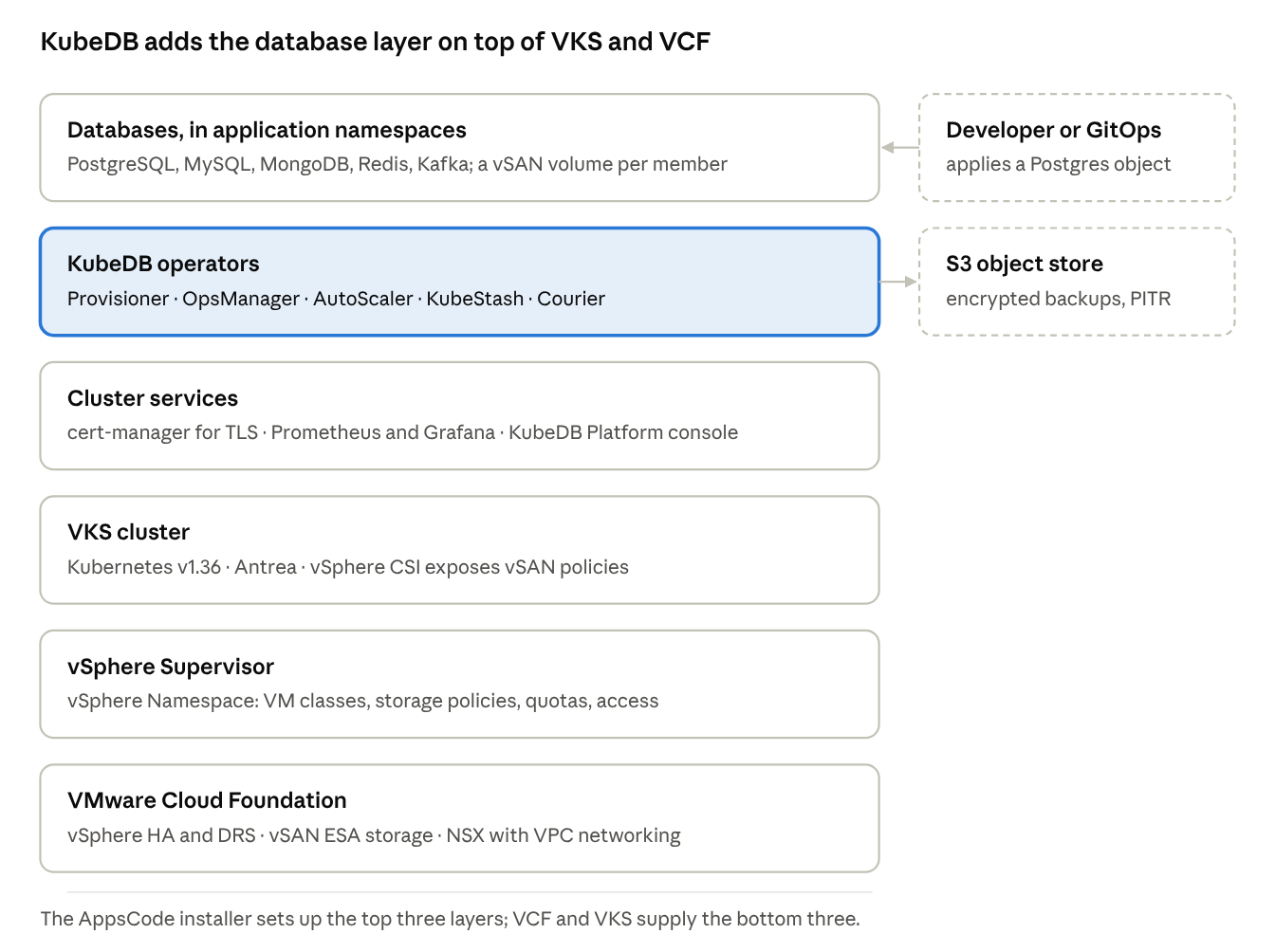
Each layer handles its own failures: vSphere HA and VKS replace failed nodes, KubeDB promotes a standby when a database member fails, and backups leave the cluster for an S3-compatible store.
VKS runs the clusters, KubeDB runs the databases
VKS provides CNCF-conformant Kubernetes clusters governed with the same vSphere tools and policies teams already use for VMs. For databases, that foundation matters: vSAN storage policies decide how each volume is protected, NSX isolates and load-balances database traffic, vSphere HA and vSphere Zones keep the nodes available, and vSphere Namespaces with vCenter Single Sign-On control who can create clusters. The vSphere administrator keeps those controls; application teams get self-service inside them.
KubeDB adds one Kubernetes custom resource per database engine and operators that automate the whole database lifecycle. It covers more than 30 engines, including PostgreSQL, MySQL, MongoDB, Redis, Kafka and Elasticsearch. The KubeDB Platform builds on the operators with a web console for self-service provisioning and day-2 operations, plus multi-cluster management across VKS clusters and clusters elsewhere. Multi-cluster management is built on Open Cluster Management (OCM) : a hub cluster registers VKS and other clusters as spokes and manages their databases from one console.
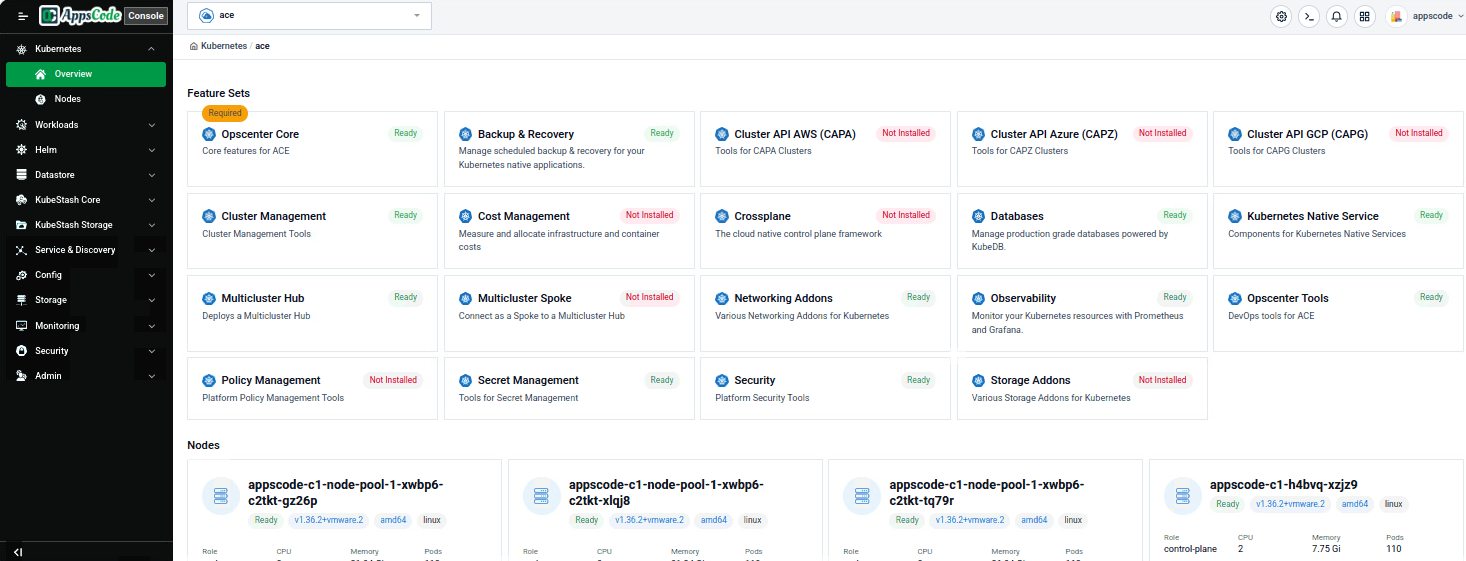
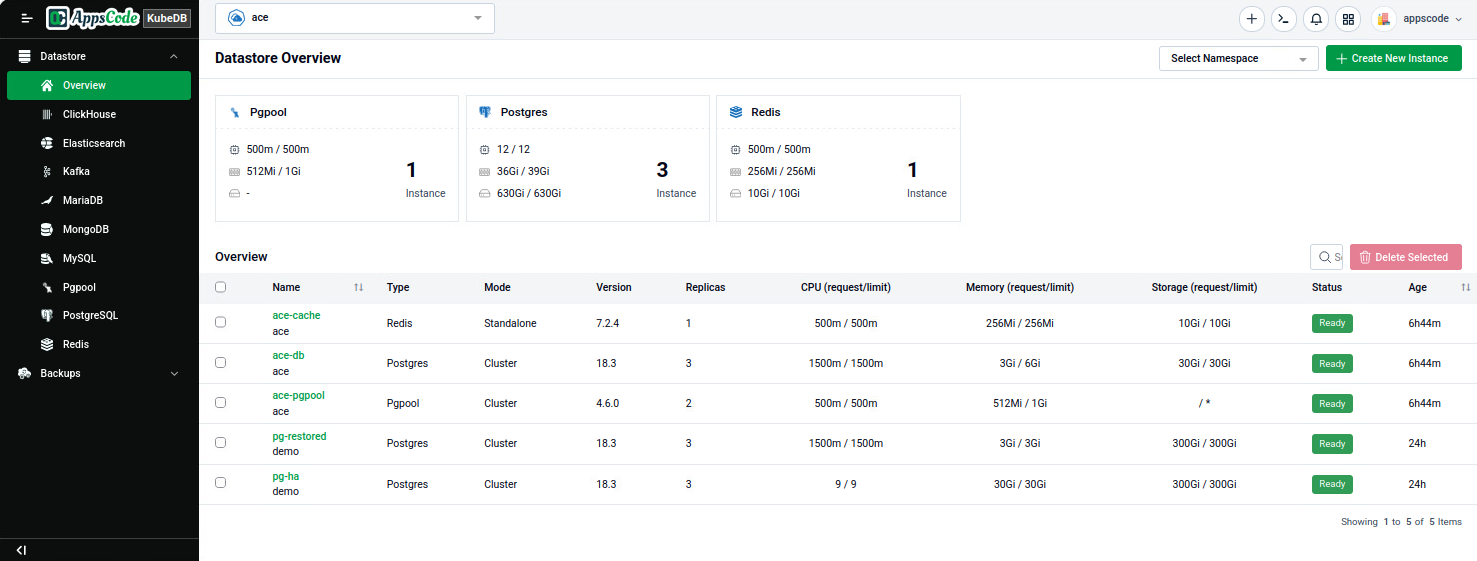
From the console, teams create databases, run backups and day-2 operations, and open each database’s Grafana dashboard without writing YAML.
| Area | VKS on VCF provides | KubeDB adds |
|---|---|---|
| Platform | Conformant Kubernetes clusters with automated provisioning and upgrades | Database operators for 30+ engines |
| Storage | vSAN storage policies exposed as StorageClasses through vSphere CSI | A persistent volume per member, online volume expansion, storage autoscaling |
| Networking | NSX and VPC networking, load balancing, Antrea | Primary and standby Services, per-database network policies |
| Security | vSphere Namespaces, vCenter Single Sign-On, cert-manager | Database TLS, credential rotation, RBAC on database resources |
| Availability | vSphere HA, vSphere Zones, automatic node replacement | Replication, automatic failover, self-healing |
| Data protection | vSphere CSI volume snapshots | Encrypted, database-aware backups with point-in-time recovery (KubeStash) |
| Operations | Supervisor services and VKS standard packages | Day-2 changes as OpsRequests, autoscaling, per-engine dashboards |
A day-2 change, such as scaling or a TLS rotation, is a small YAML object (an OpsRequest) that the operator runs step by step and records. Teams get an audit trail instead of a runbook. Because databases and OpsRequests are plain Kubernetes objects, they can live in Git and be applied by Argo CD or Flux like any other workload.
What we validated
All eight tests passed on a three-member, TLS-enabled PostgreSQL 18.3 cluster running on VKS. The lab cluster used the same Kubernetes release, ClusterClass and vSAN policy as the production design, on smaller nodes.
| Layer | Validation environment |
|---|---|
| VCF | VMware Cloud Foundation 9.0, vCenter Server 9.0.2 |
| VKS | 3.7, Kubernetes v1.36.2, Ubuntu 24.04 nodes |
| Nodes | 1 control plane (best-effort-medium), 3 workers (8 vCPU / 32 GB) |
| Storage | vSAN ESA, default RAID-5 policy |
| Network | NSX with VPC networking, one vSphere Zone |
| KubeDB | v2026.10.12 with KubeStash, cert-manager, kube-prometheus-stack |
| Test | What we did | Outcome |
|---|---|---|
| Provisioning | Applied one Postgres object with 3 replicas | Ready with one primary, two standbys, three vSAN volumes |
| Failover | Deleted the primary pod | A standby was promoted; the old primary rejoined as a standby; writes kept working with no client change |
| Volume expansion | Online, 50Gi to 100Gi | All volumes grew with no pod restarts |
| Horizontal scaling | 3 to 4 members and back | Replica count changed with the database available |
| Vertical scaling | Raised CPU and memory | Rolling restart, standbys first |
| TLS rotation | Re-issued server certificates | New certificates, data intact |
| Backup and restore | KubeStash to S3, restored into a new database | Every row restored, including rows written after the failover |
| Monitoring | Prometheus and the KubeDB Grafana dashboard | All six targets up, dashboard populated |
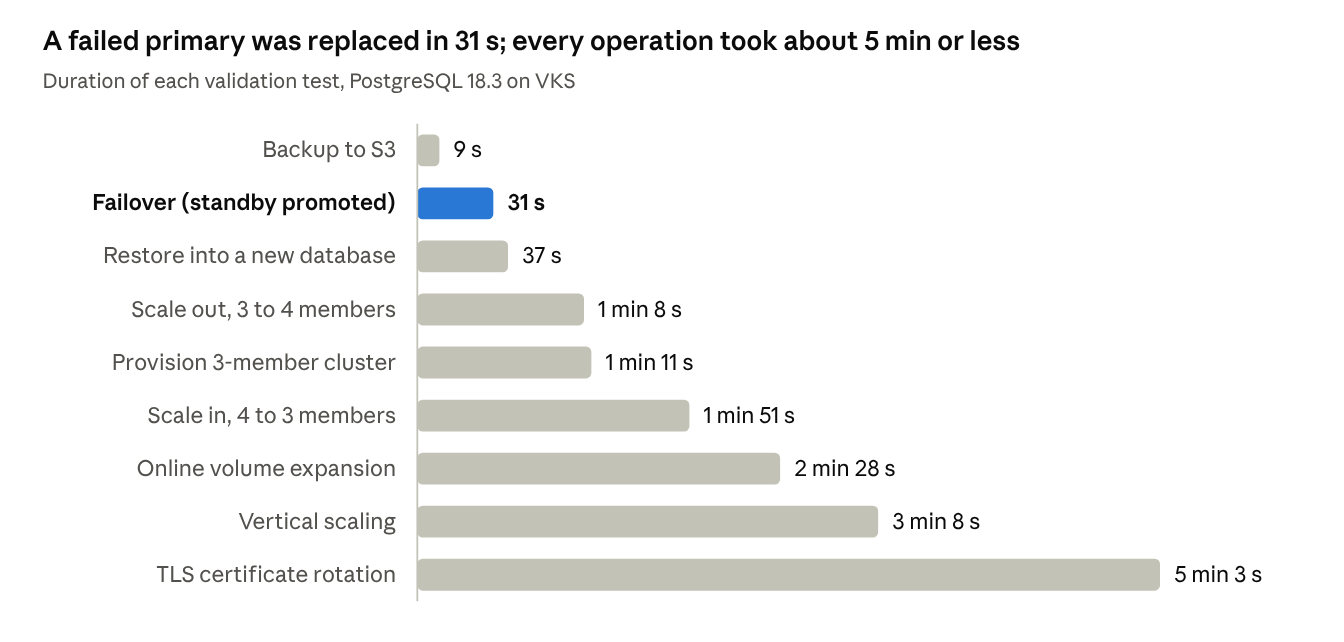
During failover, a standby was promoted in 31 s and the old primary rejoined as a standby 47 s after the failover. Rolling operations, such as vertical scaling and TLS rotation, restart standbys first and finish with a switchover, so they take longer but keep the database online.
How failover works: each member runs a pg-coordinator sidecar that handles leader election. When the primary fails, the coordinators promote a standby and KubeDB points the primary Service at it, so clients reconnect to the same address. With an even member count, KubeDB adds a small arbiter pod so the election always has a quorum.
Similar patterns apply to the other engines: the installer enables Elasticsearch/OpenSearch, Kafka, MariaDB, MongoDB, MySQL, PostgreSQL, Pgpool and Redis/Valkey by default. This validation covered PostgreSQL.
Sizing tip: when you run the full KubeDB Platform, use three guaranteed-large control plane nodes, as the reference architecture recommends.
Try it
There are two install paths. Both need a license tied to the cluster’s kube-system namespace UID, which you can request from the AppsCode License Server
.
kubectl get ns kube-system -o jsonpath='{.metadata.uid}'
| Path | Installs | Use it when |
|---|---|---|
| A. AppsCode installer (recommended) | KubeDB, KubeStash, cert-manager, monitoring, the KubeDB Platform web console and multi-cluster management, as Flux HelmReleases on the VKS helm-controller add-on | You want the full self-service platform |
| B. Helm charts | KubeDB and KubeStash only | You only need the operators |
Path B in two commands:
helm install kubedb oci://ghcr.io/appscode-charts/kubedb \
  --version v2026.10.12 --namespace kubedb --create-namespace \
  --set-file global.license=./license.txt --wait --burst-limit=10000

helm install kubestash oci://ghcr.io/appscode-charts/kubestash \
  --version v2026.10.12 --namespace stash --create-namespace \
  --set-file global.license=./license.txt --wait --burst-limit=10000
For air-gapped sites, mirror the AppsCode images to Harbor and override the image registry in the chart values.
Then a highly available PostgreSQL cluster on vSAN is one object:
apiVersion: kubedb.com/v1
kind: Postgres
metadata:
  name: pg-ha
  namespace: demo
spec:
  version: "18.3"
  replicas: 3
  standbyMode: Hot
  storage:
    storageClassName: vsan-esa-default-policy-raid5
    accessModes: ["ReadWriteOnce"]
    resources:
      requests:
        storage: 50Gi
  deletionPolicy: Delete
Day-2 changes are objects too. This OpsRequest grows every volume online from 50Gi to 100Gi, as in the validation run:
apiVersion: ops.kubedb.com/v1alpha1
kind: PostgresOpsRequest
metadata:
  name: pg-ha-expand
  namespace: demo
spec:
  type: VolumeExpansion
  databaseRef:
    name: pg-ha
  volumeExpansion:
    mode: Online
    postgres: 100Gi
Read more
- Reference architecture: KubeDB on vSphere Kubernetes Service on VMware Cloud Foundation
- Broadcom Kubernetes software partners
- Step-by-step guide and validated manifests (TLS, monitoring, backup, every OpsRequest): vmware/vks-validated-solutions/KubeDB
- KubeDB documentation and KubeStash documentation
- vSphere Supervisor services documentation
Try it on your own VCF estate. Contact AppsCode for a proof of value.
Support
To speak with us, please leave a message on our website .
To receive product announcements, follow us on X .
To watch tutorials of various Production-Grade Kubernetes Tools Subscribe our YouTube channel.
If you have found a bug with KubeDB or want to request for new features, please file an issue .