






Sharding KubeDB Autoscaler (Introduced in 2026.4.27)
Use Case
As Kubernetes clusters grow to accommodate thousands of database instances, managing their resources efficiently becomes a critical challenge. In our previous blog, we discussed Provisioner Operator Sharding , which distributes database provisioning tasks across multiple controller instances.
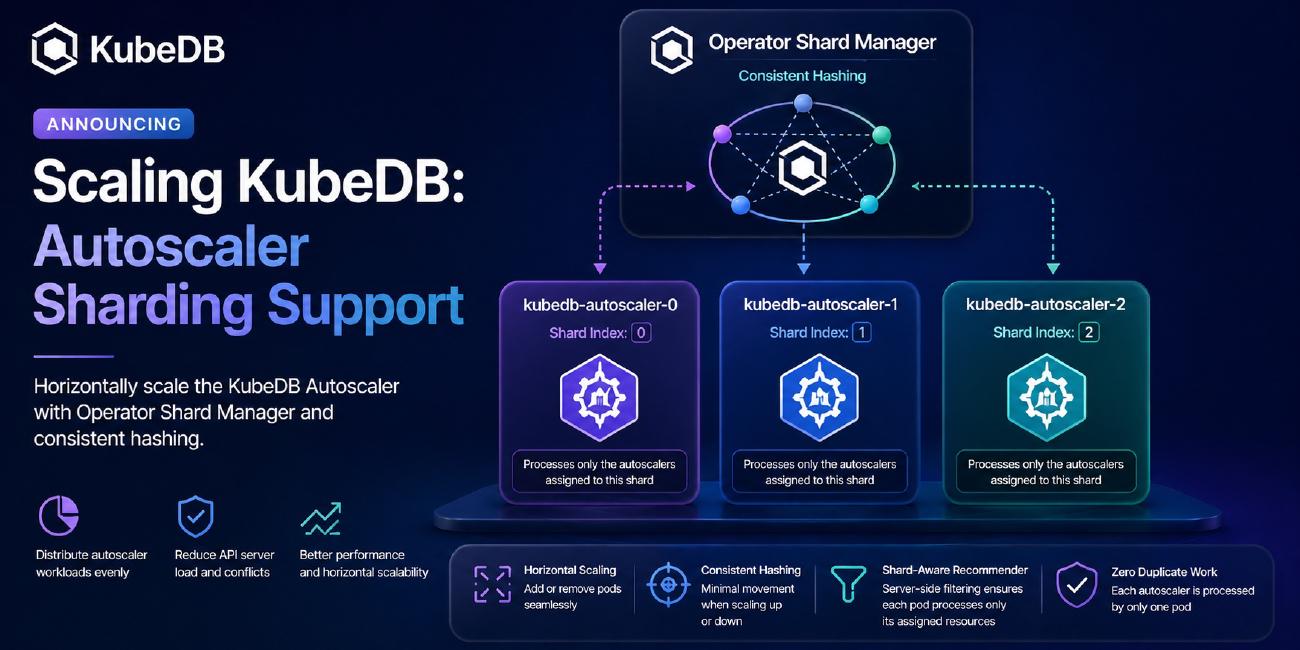
Today, we are excited to introduce Autoscaler Sharding using the Operator Shard Manager. Designed using the Consistent Hashing with bounded loads algorithm, this feature allows you to horizontally scale the KubeDB Autoscaler operator to efficiently distribute the continuous reconciliation and recommendation workloads among multiple controller pods.
Let’s dive into how this works.
Installing KubeDB
Let’s assume you have installed KubeDB in your Kubernetes cluster. If you haven’t installed it yet, follow the instructions here .
➤ helm ls -n kubedb
NAME  	NAMESPACE	REVISION	UPDATED                                	STATUS	    CHART            	APP VERSION
kubedb	kubedb   	1       	2026-04-22 20:10:43.717173607 +0600 +06	Succeeded	kubedb-v2026.4.27	v2026.4.27
This confirms that KubeDB is installed on the cluster.
Checking Installed StatefulSets
After installation, you will see the kubedb-kubedb-autoscaler StatefulSet.
➤ kubectl get pods -n kubedb
kubedb-kubedb-autoscaler-0                      1/1     Running   0   2d1h
kubedb-kubedb-ops-manager-0                     1/1     Running   0   2d1h
kubedb-kubedb-provisioner-0                     1/1     Running   0   2d1h
By default, only a single kubedb-kubedb-autoscaler-0 pod is created.
Why Do We Need Autoscaler Sharding?
Everything works fine when you have a reasonable number of database autoscaler custom resources (like a few hundred PostgresAutoscaler or MSSQLServerAutoscaler objects).
The Recommender Bottleneck
The KubeDB Autoscaler contains a Recommender component. This component runs a periodic loop (e.g., every 1 minute) that fetches all autoscaler objects, VPAs (Vertical Pod Autoscalers), and checkpoints cluster-wide to compute new resource limits and requests.
What happens when you have thousands of custom resources?
If you simply scale the kubedb-kubedb-autoscaler StatefulSet to 3 replicas without sharding, every single pod will process every single autoscaler object cluster-wide.
- They will all fetch the same metrics.
- They will all compute the same recommendations.
- They will all attempt to update the same objects.
This defeats the purpose of scaling, leading to high API server load, conflicts, and wasted CPU/Memory.
How Operator Shard Manager Solves This
With Autoscaler Sharding, the operator-shard-manager steps in to distribute the workload.
Instead of a single pod handling all CRs:
- Consistent hashing assigns each Autoscaler CR to one specific pod.
- The Recommender becomes shard-aware: It uses server-side label filtering (
client.MatchingLabels) so that each pod only fetches and processes the autoscalers assigned to its shard. - Zero duplicate processing.
Enabling Autoscaler Sharding
Let’s upgrade our KubeDB installation to enable sharding and scale our autoscaler to 3 replicas.
helm upgrade -i kubedb oci://ghcr.io/appscode-charts/kubedb \
  --version v2026.4.27 \
  --namespace kubedb --create-namespace \
  --set operator-shard-manager.enabled=true \
  --set kubedb-autoscaler.replicaCount=3 \
  --set global.featureGates.MSSQLServer=true \
  --set-file global.license=license.txt \
  --wait --burst-limit=10000 --debug
Make sure you replace
license.txtwith your valid KubeDB license.
--set operator-shard-manager.enabled=trueinstalls the Operator Shard Manager.--set kubedb-autoscaler.replicaCount=3creates 3 autoscaler operator pods (0,1, and2).
Once the upgrade completes, a ShardConfiguration object for the autoscaler is automatically created:
kubectl get shardconfiguration kubedb-autoscaler -oyaml
apiVersion: operator.k8s.appscode.com/v1alpha1
kind: ShardConfiguration
metadata:
  name: kubedb-autoscaler
spec:
  controllers:
  - apiGroup: apps
    kind: StatefulSet
    name: kubedb-kubedb-autoscaler
    namespace: kubedb
  resources:
  - apiGroup: autoscaling.kubedb.com
status:
  controllers:
  - apiGroup: apps
    kind: StatefulSet
    name: kubedb-kubedb-autoscaler
    namespace: kubedb
    pods:
    - kubedb-kubedb-autoscaler-0
    - kubedb-kubedb-autoscaler-1
    - kubedb-kubedb-autoscaler-2
Notice how omitting the kind under resources means the manager automatically shards ALL autoscaler types (Postgres, MSSQLServer, MongoDB, etc.) under the autoscaling.kubedb.com API group!
Deploy the Databases
Create your databases like PostgreSQL, MongoDB, MSSQLServer following the kubedb documentation. In this blog, we are focusing on the autoscaler sharding only.
Seeing Sharding in Action
Let’s create 3 MSSQLServerAutoscaler custom resources to see how they get distributed.
Creating Autoscaler CRs
apiVersion: autoscaling.kubedb.com/v1alpha1
kind: MSSQLServerAutoscaler
metadata:
  name: first-mssql-autoscaler-first
  namespace: demo
spec:
  databaseRef:
    name: mssql-standalone
  compute:
    mssqlserver:
      trigger: "On"
      podLifeTimeThreshold: 5m
      resourceDiffPercentage: 10
      minAllowed:
        cpu: 2000m
        memory: 3Gi
      maxAllowed:
        cpu: 3000m
        memory: 4Gi
      containerControlledValues: "RequestsAndLimits"
      controlledResources: [ "cpu", "memory" ]
---
apiVersion: autoscaling.kubedb.com/v1alpha1
kind: MSSQLServerAutoscaler
metadata:
  name: ms-auto-scaler-2
  namespace: demo
spec:
  databaseRef:
    name: mssql-std
  compute:
    mssqlserver:
      trigger: "On"
      podLifeTimeThreshold: 5m
      resourceDiffPercentage: 10
      minAllowed:
        cpu: 2000m
        memory: 3Gi
      maxAllowed:
        cpu: 3000m
        memory: 4Gi
      containerControlledValues: "RequestsAndLimits"
      controlledResources: [ "cpu", "memory" ]
---
apiVersion: autoscaling.kubedb.com/v1alpha1
kind: MSSQLServerAutoscaler
metadata:
  name: third-mssqlserver-autoscaler
  namespace: demo
spec:
  databaseRef:
    name: mssql-ag
  compute:
    mssqlserver:
      trigger: "On"
      podLifeTimeThreshold: 5m
      resourceDiffPercentage: 10
      minAllowed:
        cpu: 2000m
        memory: 3Gi
      maxAllowed:
        cpu: 3000m
        memory: 4Gi
      containerControlledValues: "RequestsAndLimits"
      controlledResources: ["cpu", "memory"]
Apply the resources:
➤ kubectl apply -f mssql-autoscalers.yaml
mssqlserverautoscaler.autoscaling.kubedb.com/first-mssql-autoscaler-first created
mssqlserverautoscaler.autoscaling.kubedb.com/ms-auto-scaler-2 created
mssqlserverautoscaler.autoscaling.kubedb.com/third-mssqlserver-autoscaler created
Checking the Shard Labels
The Operator Shard Manager automatically injects a label into the resources to assign them to specific pods.
➤ kubectl get mssqlserverautoscaler -n demo --show-labels
NAME                           AGE   LABELS
first-mssql-autoscaler-first   4s    shard.operator.k8s.appscode.com/kubedb-autoscaler=2
ms-auto-scaler-2               4s    shard.operator.k8s.appscode.com/kubedb-autoscaler=0
third-mssqlserver-autoscaler   4s    shard.operator.k8s.appscode.com/kubedb-autoscaler=1
Here:
first-mssql-autoscaler-firstis assigned to index2(kubedb-kubedb-autoscaler-2).ms-auto-scaler-2is assigned to index0(kubedb-kubedb-autoscaler-0).third-mssqlserver-autoscaleris assigned to index1(kubedb-kubedb-autoscaler-1).
Verifying Operator Logs
We can verify that the pods are aware of their shard assignments:
$ kubectl logs -n kubedb kubedb-kubedb-autoscaler-0 | grep -i ms-auto-scaler-2
"msg"="Reconcile successful" "MSSQLServerAutoscaler"={"name":"ms-auto-scaler-2","namespace":"demo"} "controller"="mssqlserverautoscaler" "controllerGroup"="autoscaling.kubedb.com" "controllerKind"="MSSQLServerAutoscaler" "name"="ms-auto-scaler-2" "namespace"="demo"

$ kubectl logs -n kubedb kubedb-kubedb-autoscaler-1 | grep -i third-mssqlserver-autoscaler
"msg"="Reconcile successful" "MSSQLServerAutoscaler"={"name":"third-mssqlserver-autoscaler","namespace":"demo"} "controller"="mssqlserverautoscaler" "controllerGroup"="autoscaling.kubedb.com" "controllerKind"="MSSQLServerAutoscaler" "name"="third-mssqlserver-autoscaler" "namespace"="demo"

$ kubectl logs -n kubedb kubedb-kubedb-autoscaler-2 | grep -i first-mssql-autoscaler-first
"msg"="Reconcile successful" "MSSQLServerAutoscaler"={"name":"first-mssql-autoscaler-first","namespace":"demo"} "controller"="mssqlserverautoscaler" "controllerGroup"="autoscaling.kubedb.com" "controllerKind"="MSSQLServerAutoscaler" "name"="first-mssql-autoscaler-first" "namespace"="demo"


$ kubectl logs -f -n kubedb kubedb-kubedb-autoscaler-0 | grep -i "Recommender running with"
I0429 13:14:32.945873       1 controller.go:134] Recommender running with shard filtering: shard.operator.k8s.appscode.com/kubedb-autoscaler=0


$ kubectl logs -f -n kubedb kubedb-kubedb-autoscaler-1 | grep -i "Recommender running with"
I0429 13:19:07.162001       1 controller.go:134] Recommender running with shard filtering: shard.operator.k8s.appscode.com/kubedb-autoscaler=1

$ kubectl logs -f -n kubedb kubedb-kubedb-autoscaler-2 | grep -i "Recommender running with"
I0429 13:16:40.158331       1 controller.go:134] Recommender running with shard filtering: shard.operator.k8s.appscode.com/kubedb-autoscaler=2
Under the Hood: Making the Recommender Shard-Aware
To achieve true horizontal scaling, we implemented a sophisticated data flow inside the Autoscaler’s Recommender pipeline.
Instead of fetching all VPAs and then filtering them in memory (which still loads the API server), the operator threads a shard-based label selector (client.MatchingLabels) down to every kbClient.List() call.
// The label selector generated dynamically based on the pod's identity
shardListOpts = [MatchingLabels{"shard.operator.k8s.appscode.com/kubedb-autoscaler": "1"}]
When kubedb-kubedb-autoscaler-1 runs its periodic loop, the API server natively filters and returns only the autoscalers related objects labeled with 1. This guarantees that if you scale to 5 operator pods, each pod does exactly ~20% of the work, heavily optimizing CPU, Memory, and Network I/O.
Scaling Operations and Consistent Hashing
What happens if 3 replicas aren’t enough, and you scale to 5? The Shard Manager detects the new pods, Because we use consistent hashing, only ~40% of the autoscalers are relabeled and moved to the new pods. The remaining 60% stay exactly where they are. Minimal resource movement ensures that metrics history and internal caches remain warm, avoiding sudden API traffic spikes.
Supported Autoscaler Types
Because the ShardConfiguration targets the API group (autoscaling.kubedb.com), all KubeDB autoscaler CRs are supported out-of-the-box with zero configuration changes required from the user.
Supported databases include, but are not limited to:
- ✅ PostgresAutoscaler
- ✅ MSSQLServerAutoscaler
- ✅ MongoDBAutoscaler
- ✅ MySQLAutoscaler
- ✅ MariaDBAutoscaler
- ✅ RedisAutoscaler
- ✅ ElasticsearchAutoscaler
- ✅ KafkaAutoscaler
- …and many more!
Summary
With Autoscaler Sharding:
✅ Horizontal scalability is now possible for autoscaler operator with continuous database recommendation workloads.
✅ Better performance as each pod manages fewer autoscalers.
✅ No changes required to your existing Autoscaler CRs.
Support
To speak with us, please leave a message on our website .
To receive product announcements, follow us on Twitter/X .
Learn More about Production-Grade Databases in Kubernetes
If you have found a bug with KubeDB or want to request new features, please file an issue .